If you’ve ever wandered the aisles of a trade show, browsed custom signage online, or slapped a custom decal on a camper van, odds are you’ve interacted with two workhorses of the sign and craft industries: PVC foam board and vinyl cutters. As a supplier who’s sold PVC foam board to sign shops, makers, and small business owners for over seven years, I get so many questions: “Can I run this on my vinyl cutter?” “Will it tear my blade?” “Is the finish going to hold up if I cut it?” I’ve fielded these from a part-time hobbyist with a desktop cutter in his garage and a sign shop owner who’s had to replace three blades in one afternoon because he paired the wrong materials wrong. Today, I’m breaking down the real, science-backed answer: does PVC foam board work with vinyl cutters? Short answer: yes—when you do it right. The long answer is where most people mess up, and it’s where I’ve seen half the avoidable mistakes that waste time, money, and good materials. PVC Foam Board
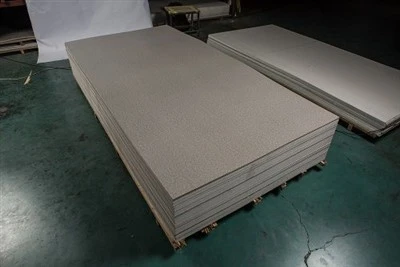
First, let’s get on the same page about what we’re talking about. Not all PVC foam board is created equal. That’s the biggest myth I see: people grab any PVC sheet from a hardware store and expect it to work with a $300 vinyl cutter. The PVC foam board I supply is closed-cell PVC foam, the kind rated for sign and craft use—usually 0.5mm to 10mm thick, with a dense, rigid outer skin on both sides and a lightweight, air-cored foam core. The hardware store variety, on the other hand, is often low-density open-cell foam, meant for insulation or kids’ craft projects, with a soft, crumbly core that tears easily when cut. Vinyl cutters work by dragging a sharp blade along a flat surface, following a digital design, to cut through thin, flexible materials like vinyl, adhesive-backed stickers, or thin cardstock. The cutter’s bed is flat, the blade is spring-loaded, and pressure and speed are the two most critical settings for a clean cut. So the first question isn’t “can PVC foam board work” — it’s “is this the right kind of PVC foam board for a vinyl cutter.”
Let’s talk about thickness first, because that’s non-negotiable. Most consumer desktop vinyl cutters (the ones hobbyists use) have a maximum cut depth of about 3mm. If you’re running a 5mm PVC foam board through one of these, you’re asking for trouble. The blade will only cut partway through, leaving a ragged edge, or it will dig too deep, chewing into the cutter’s bed and dulling the blade instantly. For desktop cutters, I recommend PVC foam board that’s between 1mm and 3mm thick. Thin, lightweight enough that the cutter can grab it without slipping, rigid enough that it doesn’t bend or warp mid-cut. For industrial vinyl cutters, the ones sign shops use, that max thickness jumps to 10mm for most models. I’ve had a client who cut 8mm thick PVC foam boards for parking signs on a 24-inch Roland cutter, and it worked perfectly—once he adjusted the settings. The key here is matching the material thickness to your cutter’s rated capacity. I always tell new customers to check their cutter’s manual before buying PVC foam board; it’s a 10-second step that saves hundreds in replacement blades and ruined materials.
Next, blade selection. This is where I’ve seen so many people go wrong. Vinyl cutters use different blades for different materials. A standard 45-degree blade, meant for thin vinyl and stickers, will not work on PVC foam board. It’s too sharp, too thin, and it will dig through the outer skin of the PVC instead of cutting through it cleanly. The blade you need is a 60-degree drag knife, specifically rated for rigid, medium-density materials like foam board, cardboard, or thin wood. The 60-degree angle is wider, more robust, and it applies pressure in a way that cuts through the dense outer skin and foam core without tearing. I supply blade guides with every bulk PVC foam board order, and I always make a point to remind new buyers: don’t reach for the blade you use for vinyl. Reach for the one that’s meant for thicker, rigid materials. I also recommend changing your blade before every big project. Even a “sharp” blade that’s been used to cut thin vinyl for a week will have a tiny burr on the edge that will leave a messy cut on PVC foam board. A new 60-degree blade is $15, and it’s worth every penny to avoid having to redo a 50-sign order because of dull blades.
Pressure and speed settings. This is the fun part, and it’s where most people wing it instead of doing a test cut. Vinyl cutter settings aren’t one-size-fits-all for materials. For thin vinyl, you might set pressure to 10 and speed to 50, but for PVC foam board, that’s way too low. I always tell customers to run a test cut on a scrap piece of the exact same PVC foam board they’re using before they cut their final design. How do you do a test cut? Save a tiny design, like a 2-inch square and a small circle, and load it into your cutter. Start with pressure set to 25, speed set to 15, and blade offset (that little number that adjusts how far the blade cuts from the design line) set to 0. Run the test cut, then pull the material off the bed. If the cut doesn’t go all the way through, increase pressure by 2 and run another test. If the blade cuts through the foam core but tears the outer skin on the back, decrease pressure by 2. If the material is moving around mid-cut, increase speed slightly—if it’s taking too long, increase pressure. The sweet spot is when the blade cuts all the way through the PVC foam board in one pass, the edge is clean, and the outer skin on the back isn’t torn. I’ve had clients who skip this step and end up with a whole sheet of material ruined because they used the wrong pressure. Last year, a regular customer of mine tried to cut 3mm PVC foam board on a desktop cutter, used a 45-degree blade, and set pressure to 10. He texted me a photo of a sheet with half the designs cut, half not, and said “this stuff is garbage.” It wasn’t garbage—it was his settings. Once he adjusted to a 60-degree blade, pressure 22, speed 12, he sent me a photo of a perfect set of custom signage for a local coffee shop. That’s the difference.
Now, let’s talk about common mistakes that people make, even when they get the settings and blade right. First, prepping the material. PVC foam board is smooth, almost non-porous, which means it can slip on the cutter’s bed if you don’t secure it. I always recommend using a low-tack adhesive spray, meant for craft materials, or a removable adhesive mat, to hold the PVC foam board down. If it slips mid-cut, you’ll get off-line designs, ragged edges, and possibly damaged blades. I’ve also seen people leave PVC foam board in a cold garage or hot truck before cutting it, which causes it to warp. Warped material won’t lie flat on the cutter’s bed, so the blade will cut unevenly. Always let your PVC foam board acclimate to room temperature for at least 24 hours before cutting. That’s a small step, but it makes a huge difference. Another mistake: cutting too many designs in one pass. If you’re cutting a whole sheet of small decals, don’t try to cut them all at once. The more designs on the sheet, the more the material can flex as the blade goes through, leading to torn edges. Cut designs in smaller batches, and you’ll get cleaner results.
Wait a second—are there any cases where PVC foam board won’t work with a vinyl cutter? Yeah, two main ones. First, if your cutter is rated for materials thinner than 1mm or thicker than 10mm, depending on the model. You can’t run 12mm thick PVC foam board on a hobbyist desktop cutter meant for thin materials; that’s just asking for damage. Second, if you’re trying to cut ultra-fine details, like lettering smaller than 1 inch tall, with a vinyl cutter. Vinyl cutters work best with details that are at least 1 inch wide, because the blade has to maneuver around small curves. If you try to cut a 0.5-inch letter, the blade will often tear the edge of the letter, and it won’t come out clean. For ultra-fine details, you’d be better off with a laser cutter, but for most sign, craft, and custom projects, PVC foam board works perfectly with a vinyl cutter.
I’ve been in this industry long enough to know that there’s a lot of misinformation out there about PVC foam board and vinyl cutters. Some people will tell you it’s impossible, some will tell you any PVC will work, and most will leave out the small, critical details that make it work. The truth is, PVC foam board is one of the best materials for vinyl cutters, if you pick the right type, use the right blade, and adjust your settings correctly. It’s lightweight, durable, moisture-resistant, and cheap compared to wood or metal, which makes it perfect for everything from custom signage and wall art to camper van decals and yard signs.
If you’re looking for high-quality PVC foam board to use with your vinyl cutter, we carry a range of thicknesses from 1mm to 10mm, all tested to work with hobbyist and industrial vinyl cutters alike. We also offer free setting guides for every order, so you don’t have to waste time experimenting. Whether you’re a part-time hobbyist just starting out or a sign shop owner with 50 custom projects a week, we can provide the PVC foam board you need to get clean, perfect cuts every time.
Don’t waste time and money on low-quality PVC foam board that doesn’t work with your vinyl cutter. Reach out to us to discuss your project, your cutter model, and the thickness you need. We’ll help you pick the right material, share tips to get the best results, and make sure you have everything you need to finish your project on time and on budget.
PVC Wall Panel References:
- Vinyl Cutter Operating Manual, Roland DG Corporation, 2022
- PVC Foam Board Specifications and Applications, American Plastics Council, 2021
- Cutting Settings for Rigid Foam Materials, Sign Industry Association, 2020
- Blade Selection for Vinyl Cutters, Roland DG Technical Support, 2023
Shandong Fanjie International Trade Co., Ltd.
As one of the most professional PVC foam board manufacturers in China, we have world-leading production equipment and strong manufacturing capabilities. Please feel free to buy bulk high quality PVC foam board from our factory. We also accept customized orders.
Address: L4-015 Cross border E-commerce Entrepreneurship Park, Lanshan District, Linyi City, Shandong Province
E-mail: info@lsdec.com
WebSite: https://www.fanzeradecor.com/
